

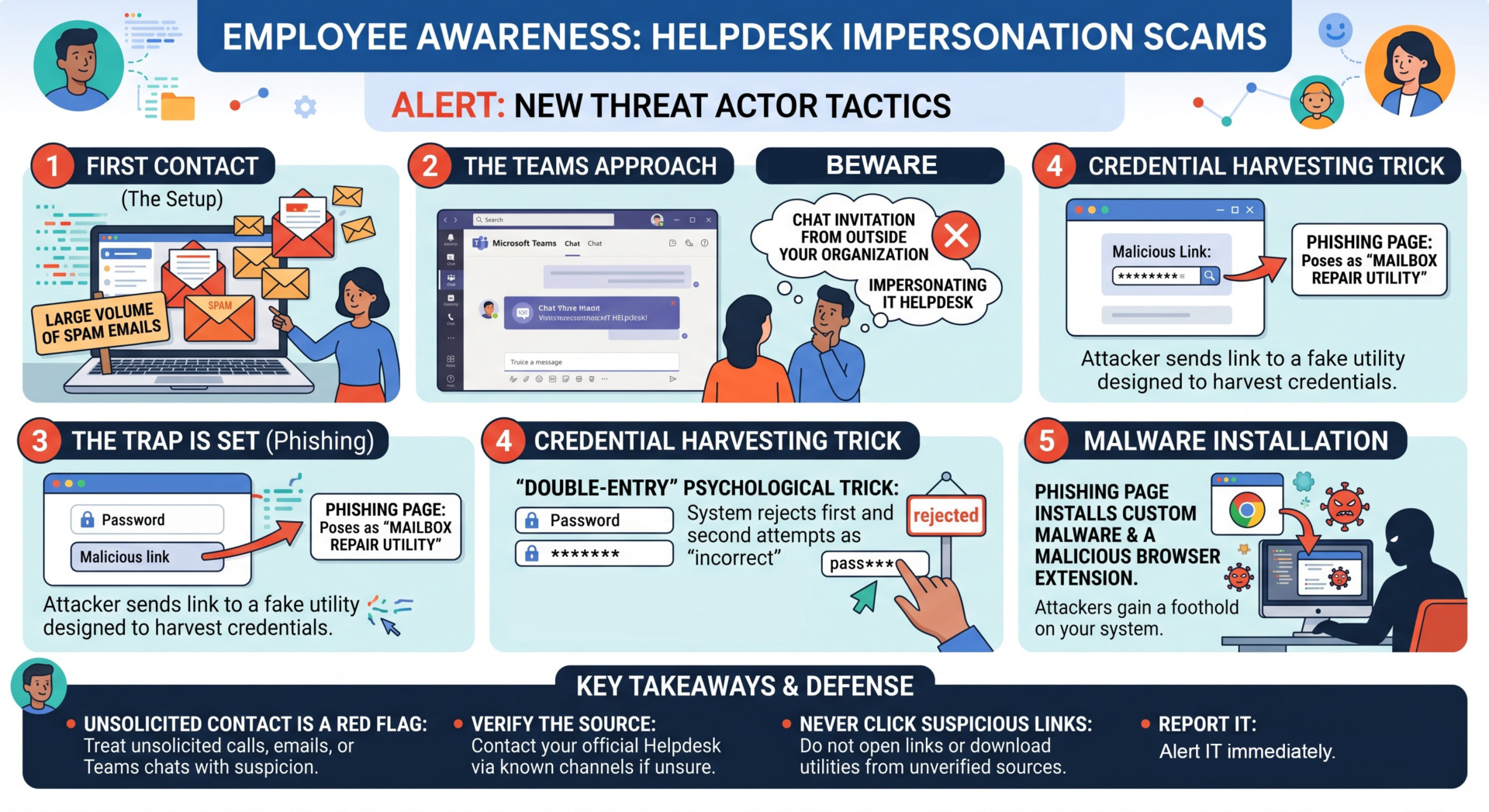
Cybercriminals are getting smarter. According to recent findings from Google’s Threat Intelligence Group (GTIG), a new threat actor tracked as UNC6692 is successfully bypassing traditional security filters by doing something very simple: pretending to be the people hired to help you.
Here is the breakdown of how this specific “Helpdesk Imposter” attack works and what you need to look out for to keep our company data safe.
The Attack Playbook: How UNC6692 Operates
This isn’t a random phishing link; it is a calculated, multi-step social engineering campaign designed to exploit your trust in internal tools like Microsoft Teams.
- The Inbox Flood: The attack often begins with a massive wave of spam emails sent to your inbox. This is intentional—it’s designed to frustrate you and make you wish someone would fix it.
- The “Hero” Appears: Shortly after, you’ll receive a message on Microsoft Teams from someone claiming to be from the IT Helpdesk. They will offer to help you block the spam and clean up your inbox.
- The Outside Invitation: Red Flag Alert! The attacker will send a chat invitation from an account outside of our organization. They rely on users clicking “Accept” because they believe IT is just using a different system to reach them.
- The Fake Utility: Once they have your trust, they send a link to a “Mailbox Repair Utility.” This is a phishing page designed to steal your login credentials.
- The “Double-Entry” Trick: To make the site look real, the page is programmed to reject your password the first two times you enter it. This psychological trick makes you think the system is “validating” your info, while ensuring the attacker gets your password twice (eliminating typos for them).
What Happens Next?
If the credentials are harvested, the site will prompt you to install a custom browser extension or software. Once installed, the attackers have a “foothold” in our system, allowing them to steal data, monitor traffic, and move deeper into our network.
How to Protect Yourself and the Company
- Verify the Source: Official IT support will rarely contact you via an “External” Teams account. If the chat window says the user is from outside the organization, do not engage.
- Don’t Trust the “Reject”: If a company login page rejects your known correct password multiple times, stop immediately. Close the tab and report it.
- Use Official Channels: If you are experiencing high spam volume, contact the Helpdesk through our official portal or internal phone extension—don’t wait for them to find you.
- Report It: If you receive a suspicious Teams invite or an unexpected “Mailbox Repair” link, use the “Report Phish” button in your email or alert the Security Operations Center (SOC) immediately.
Stay vigilant. Cyber defense is a team sport!